Guide · Recording
Record a route
Start, pause and stop a recording, then name the route you made.
- Map screen
- Bottom sheet
Recording is three buttons: Start, Pause and Stop. Yut saves every point as it comes in, so nothing is lost if the phone dies or iOS closes the app.
Wait for GPS locked on the sheet, then tap Start tracking.
Put the phone away. Yut keeps recording with the screen locked.
Need a break? Tap Pause, then Resume when you set off again.
Done? Tap Stop, name the route and tap Save.
1. While you record
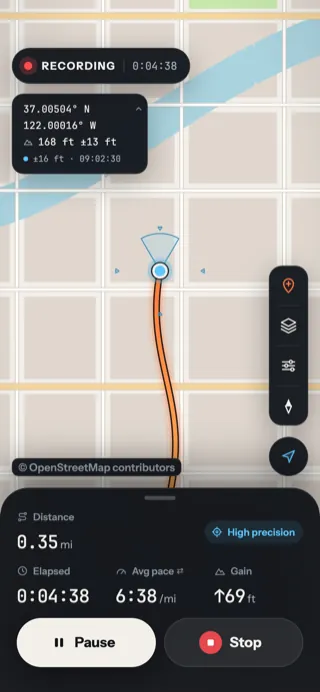
- RECORDING and the time so far.
- Your route, drawn as you go.
- Distance so far.
- The precision mode. See High precision or Battery saver.
- Time, average pace and climb. See Read your numbers.
- Pause stops the clock.
- Stop ends and saves the route.
2. Pause and resume
Pause when you stop for lunch or load the bike on the truck. Nothing you travel while paused counts toward the distance, the time or the climb.
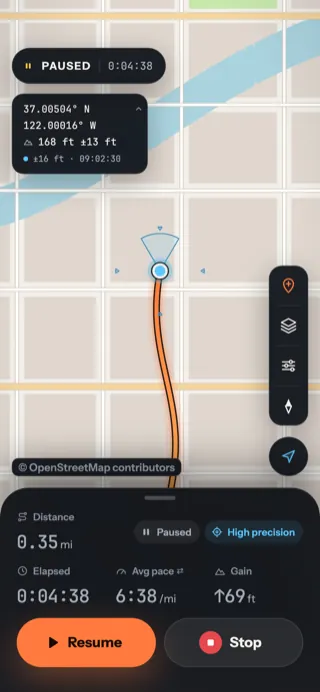
- PAUSED — the clock stands still.
- A Paused chip, and the figures dim.
- Resume picks up where you are now.
- Stop still works while paused.
3. Stop and name it
Stop saves the route at once, then asks for a name. You can skip it: an unnamed route is called by its date and time, such as Tue Sep 29, 8:59 AM.
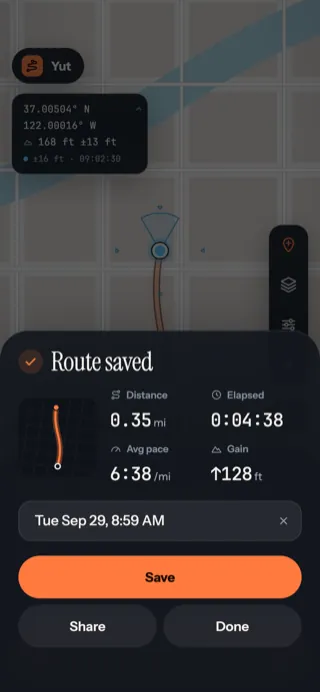
Route saved
The route's outline and figures, with a name box already filled with the date and time.
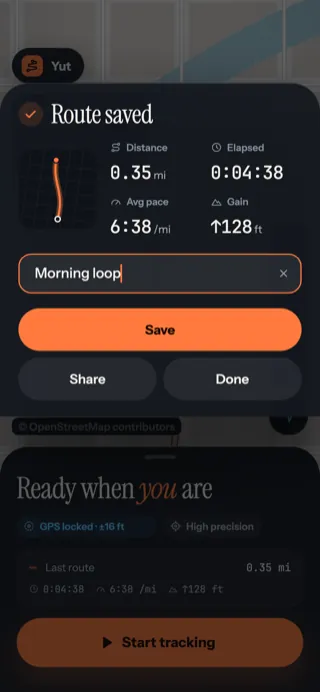
Type a name
The first tap selects the whole date, so just type over it. Then tap Save.
| Button | What it does |
|---|---|
| Save | Keeps the name you typed (an empty box keeps the date and time) |
| Share | Shares a picture of the route. See Share and export |
| Done | Closes the sheet; the route keeps its date and time |
You can rename a route at any time from its page in Your routes.
Updated October 12, 2026 · Still stuck? Ask us